Shopify Bulk Order Functionality with Store Credits: A Simple Guide
Shopify custom app’s powerful bulk order functionality and store credits system can help your online store handle large orders effortlessly and offer flexible payment options. Improve order management, increase customer loyalty, and deliver a seamless shopping experience with this easy-to-integrate Shopify solution designed specifically for merchants looking to grow their business.
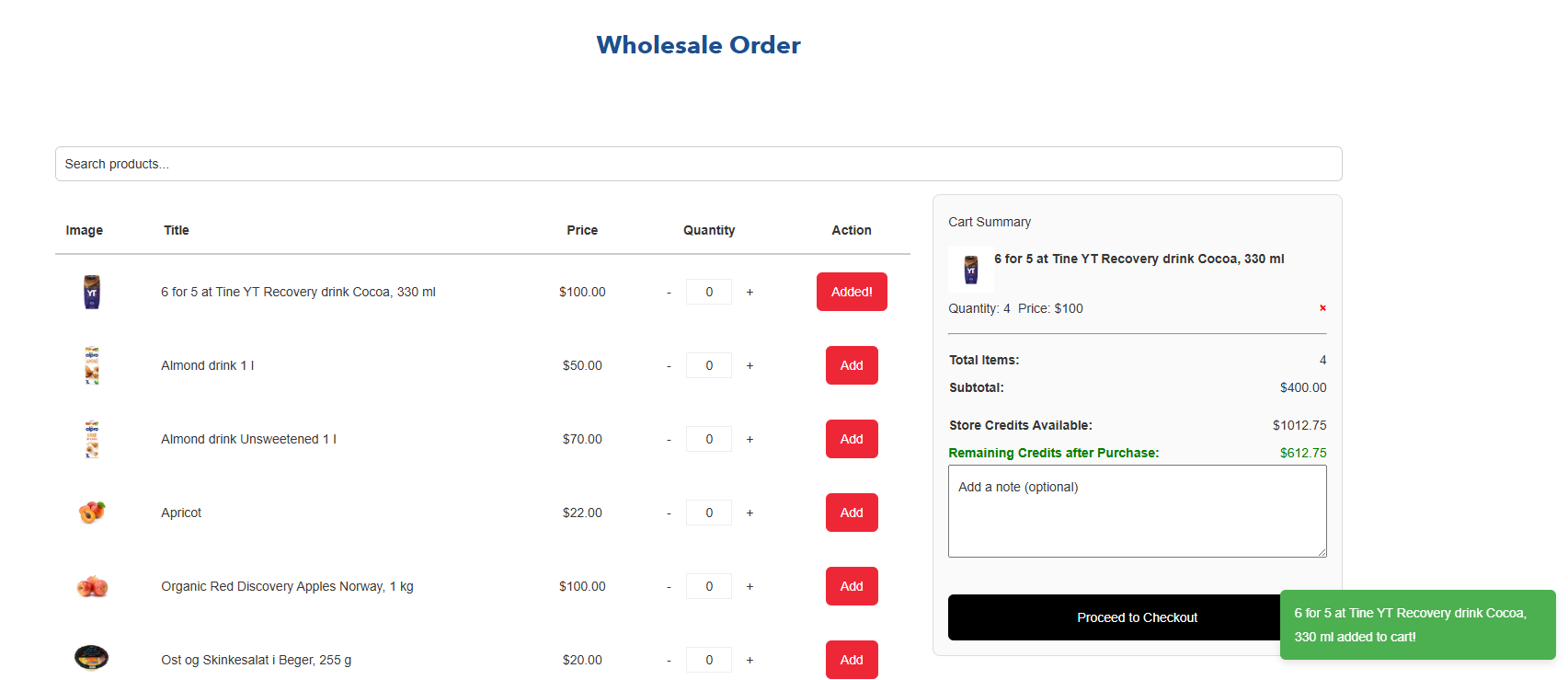
Running an online store or managing purchases for a business can sometimes feel complicated — especially when customers want to place large orders or pay using store credits instead of cash or cards. If you’re not a technical person, understanding these concepts might seem overwhelming.
This blog explains, in simple terms, what bulk order functionality and store credits mean, why they are useful, and how they work together to make shopping easier and more flexible for both businesses and customers.
What is Bulk Order Functionality?
Imagine a company wants to buy 100 t-shirts for their employees instead of just one or two. A bulk order means placing a single order with a large quantity of products at once.
Bulk order functionality is a feature built into an online store that allows customers to do this easily. Instead of clicking “Add to Cart” 100 times, customers can add 100 items with just a few clicks.
Why is Bulk Ordering Important?
- Saves time: Customers can order many items quickly.
- Better prices: Stores often offer discounts for bulk purchases.
- Easy management: Businesses can track and manage large orders smoothly.
“Bulk ordering is a win-win. Customers save time and money, and businesses get bigger sales.”
What are Store Credits?
Store credits are like digital money that customers can use to pay for products in the store. Think of it as a prepaid balance or a gift card.
Instead of paying with cash or a credit card at checkout, customers can use their store credits to complete purchases.
How Do Customers Get Store Credits?
- As refunds for returned items
- Promotional rewards or loyalty points
- Gift cards purchased or received
Benefits of Store Credits
- Convenient: Quick payment method without re-entering card details.
- Encourages repeat business: Customers are more likely to return and spend their credits.
- Flexible refunds: Instead of cash refunds, credits keep money in the store.
How Bulk Orders and Store Credits Work Together
Combining bulk order functionality with store credits can make the shopping experience smoother, especially for businesses that order frequently or in large amounts.
Here’s how it typically works:
- A customer logs into their account with store credits available.
- They select multiple items and enter quantities for each product using the bulk order form or page.
- The store automatically calculates the total cost, applying any bulk discounts.
- At checkout, the customer uses their store credits to pay partially or fully for the order.
- If the credits don’t cover the full amount, the remaining balance can be paid using a credit card or other methods.
Advantages for Businesses
- Cash flow management: Businesses can budget purchases better by using store credits.
- Streamlined purchasing: Bulk orders reduce administrative work.
- Improved customer loyalty: Store credits encourage repeat orders.
Advantages for Store Owners
- Increased sales: Bulk orders bring larger revenue.
- Better customer relationships: Offering store credits creates goodwill.
- Lower refund processing costs: Store credits avoid cash refunds.
Common Features of Bulk Order Systems
Many stores with bulk order functionality offer these handy features:
- Bulk upload: Customers upload CSV or Excel files with product SKUs and quantities.
- Quick add forms: A table or list where customers enter quantities directly.
- Minimum quantity rules: Ensures customers meet bulk order minimums for discounts.
- Automatic discounts: Bulk purchase discounts apply automatically at checkout.
Using Store Credits: What You Should Know
- Balance tracking: Customers can view their credit balance anytime in their account.
- Expiration dates: Some credits may expire, so it’s good to use them promptly.
- Partial payments: Credits can usually be combined with other payment methods.
- Restrictions: Some items or categories may not be eligible for purchase with store credits.
How to Get Started with Bulk Orders and Store Credits
If you’re a store owner considering adding these features, here’s a simple roadmap:
- Choose a platform or app: Many e-commerce platforms offer built-in or add-on bulk order and store credit features.
- Set rules: Define minimum order quantities and discount levels.
- Enable store credits: Decide how customers will earn credits (returns, promotions, etc.)
- Educate customers: Clearly explain how bulk orders and store credits work.
- Test everything: Run some test orders to ensure smooth experience.
Tips for Customers Using Bulk Orders and Store Credits
- Check your credit balance: Know how much you can spend before placing orders.
- Plan purchases: Combine smaller orders into bulk purchases to save time and money.
- Ask about expiration: Don’t lose credits due to expiration.
- Keep communication open: Contact customer service if you have questions about your credits or orders.
Frequently Asked Questions (FAQs)
Can I use store credits for any product?
Usually, yes, but some products like gift cards or special items might be excluded. Always check store policies.
How do I know if I qualify for bulk discounts?
Stores usually display minimum quantities needed for bulk pricing on product pages or at checkout.
What happens if my store credits don’t cover the full order?
You can pay the remaining balance with a credit card, PayPal, or other accepted payment methods.
Can I return products bought with store credits?
Yes, but refunds may be issued back as store credits instead of cash.
Summary
Bulk order functionality combined with store credits offers a powerful way to make shopping easier and more flexible for businesses and their customers. It saves time, encourages loyalty, and helps everyone manage budgets better.
Whether you’re a customer placing a large order or a store owner wanting to provide a smooth shopping experience, understanding these features can bring big benefits.
If you want to learn more or need help setting these up, feel free to reach out to your store’s customer service or contact a trusted e-commerce expert.
Written by: Gurdeep Singh
Tags: Bulk Orders, Store Credits, E-commerce, Online Shopping, Customer Guide
Alliance IT Solutions
Related Articles

How to Know When Your Website Needs a Redesign
Your website is often the very first impression your business makes. If it's slow to load, difficult to navigate, or looks like it was built a decade ago, potential customers won't wait around to give you a second chance. Many businesses hold on to outdated websites far longer than they should — and quietly lose leads, credibility, and revenue every single day as a result.
Read More
Shopify vs WordPress vs Webflow: Which Platform Wins for AI-Powered Websites in 2026?
The platform you build on shapes everything — your SEO ceiling, your AI capabilities, your maintenance costs, and your ability to scale. Here is the most complete, honest comparison for businesses in the US, Australia, and New Zealand.
Read More
How AI-Powered Search Is Reshaping Shopify SEO in the US, Australia, and NZ
Google AI Overviews, ChatGPT, Perplexity, and Bing Copilot are changing how customers find products online. Here's what it means for your Shopify store — and exactly what to do about it.
Read MoreNeed Help with Your Project?
Our expert team is ready to help you implement these strategies and build amazing web solutions.
Get Free Consultation