Running a Shopify store in 2026 without automation is like staffing a warehouse by hand when forklifts exist. The tools are mature, the integrations are deep, and merchants winning online have one thing in common: they've removed themselves from repetitive tasks and focused entirely on growth. This guide covers every major automation category, the exact tools to use, ready-to-deploy Shopify Flow blueprints, and a prioritised 90-day roadmap.
01 Why Shopify automation matters more than ever in 2026
The average Shopify merchant in 2026 manages 4× more SKUs, operates across 3+ sales channels (online store, Shop app, TikTok, Amazon), and faces customer expectations shaped by same-day delivery and instant support — all without proportional headcount growth. Automation is no longer a nice-to-have. It is the operational infrastructure that separates growing stores from stagnating ones.
Consider what a 5-person team without automation is doing manually every day: tagging and routing orders, following up on abandoned carts, sending loyalty emails, monitoring inventory, answering "where is my order" tickets, and compiling weekly sales reports. Each of these tasks can be fully automated in under an hour of setup — and once running, they execute perfectly at 2am on a public holiday.
Key insight: Automation isn't just about saving time — it's about consistency at scale. A triggered email always goes out at exactly the right moment. A loyalty point is always applied. A low-stock alert never gets forgotten on a busy Friday. Humans are inconsistent; workflows are not.
The real ROI of automation
Most merchants underestimate automation ROI because they only count time saved. The full picture includes: higher conversion rates from better-timed emails, lower customer acquisition costs from improved retention, fewer support tickets from proactive order updates, and reduced inventory write-offs from better forecasting. A well-automated Shopify store typically sees a 15–25% improvement in net margin within 6 months.
02 The six core Shopify automation categories
Every Shopify automation falls into one of six operational categories. Understanding which category a workflow belongs to helps you prioritise what to build first and which tools to use.
Email & SMS marketing
Welcome series, abandoned cart recovery, win-back, post-purchase upsell, review requests, birthday campaigns.
Order & fulfillment
Auto-tagging, 3PL routing, packing slip generation, fraud holds, split order handling, custom confirmation flows.
Inventory management
Reorder alerts, multi-location sync, auto-hide sold-out products, supplier PO generation, demand forecasting.
Customer service
AI chat deflection, ticket classification, "where is my order" automation, returns initiation, proactive delay alerts.
Loyalty & retention
Points triggers, VIP tier upgrades, referral automation, birthday rewards, churn prediction alerts.
Reporting & finance
Daily revenue digests, Slack channel alerts, Xero/QuickBooks sync, tax filing prep, inventory valuation.
Where to start: Prioritise by revenue impact. Email & SMS marketing automation typically delivers the fastest ROI — an abandoned cart flow alone can recover 5–15% of lost revenue within the first week of deployment.
03 Shopify Flow — the native automation engine
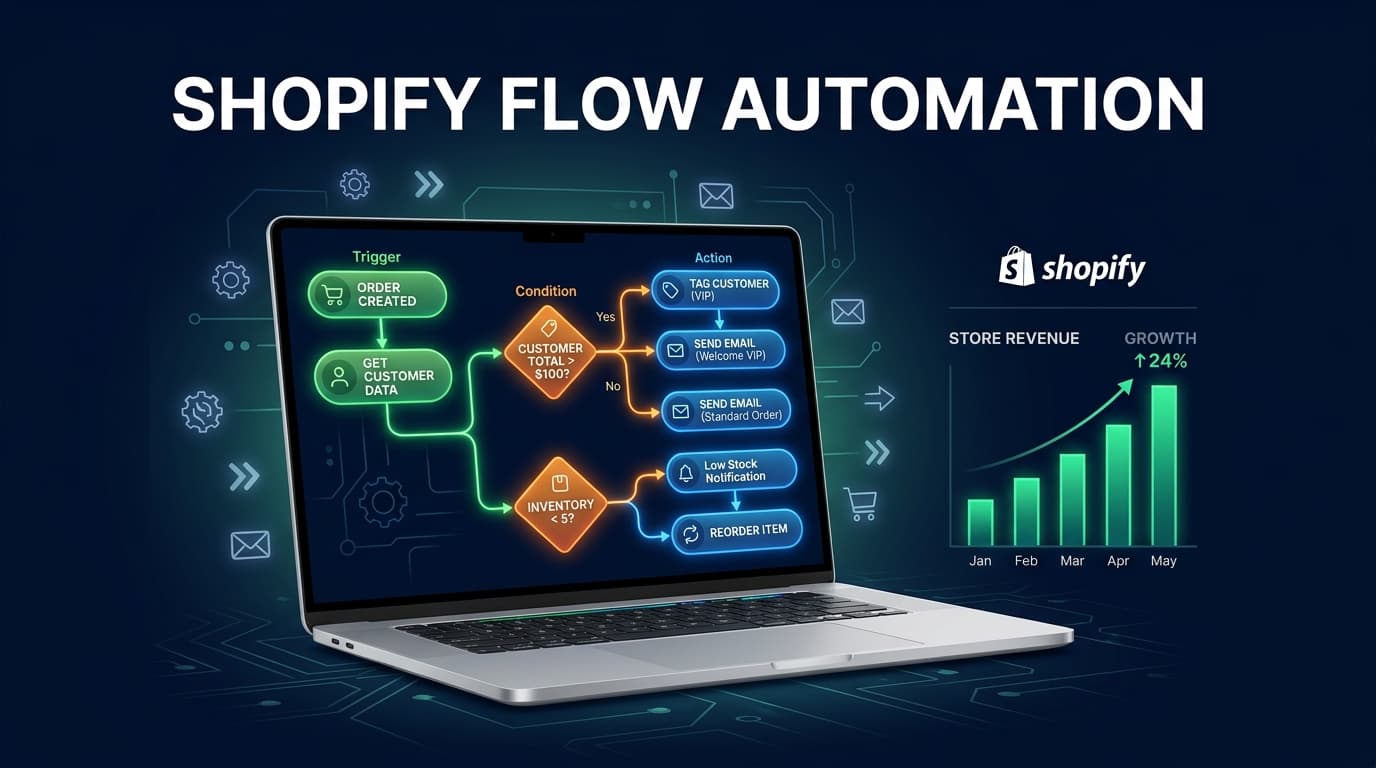
Shopify Flow is a free, no-code workflow builder built directly into Shopify, available on all plans including Basic. It uses a Trigger → Condition → Action architecture. When an event happens in your store (the trigger), Flow checks whether certain rules are met (conditions), and if so, performs one or more tasks automatically (actions).
Flow v4, released in early 2026, added support for multi-branch logic, time delays up to 30 days, parallel action paths, and native integration with Metafields — making it powerful enough to replace paid tools for the majority of automation use cases.
Shopify Flow · Interactive Blueprints
Real-world workflow diagrams
Click a workflow to see how it's structured inside Shopify Flow
Trigger
Order created
Fires on every new order regardless of channel
Condition
Order total > $500?
Threshold for high-value order review
Condition
Risk score > 60?
Shopify's built-in fraud analysis score
Action
Auto-fulfil order
Route to default 3PL warehouse
Action
Hold + alert team
Pause fulfilment, send Slack msg to #fraud
Action
Tag + fulfil
Add "high-value-verified" tag, fulfil order
Trigger
Order paid
Fires after every successful payment
Condition
Customer lifetime spend > $500?
Cumulative across all orders, including this one
Condition
Customer already tagged "VIP"?
Prevents duplicate actions on repeat purchases
Action
Add "VIP" tag to customer
Triggers VIP welcome email in Klaviyo via tag segment
Action
No action
Stop — workflow ends here
Trigger
Inventory quantity changed
Fires whenever stock level is updated for any SKU
Condition
Inventory quantity < 10 units?
Adjust threshold per SKU velocity in your store
Action 1
Send email to supplier
Reorder request with SKU, current qty, and reorder qty
Action 2
Send Slack alert
Notify #ops channel: product name, variant, qty remaining
Action 3
Add metafield tag
Set product.low_stock = true for storefront badge
Trigger
Order created
Capture every completed purchase as a signal
Wait — Time delay
Wait 90 days
Flow v4 supports delays up to 30 days; chain two for 90
Condition
Customer has purchased in last 90 days?
Checks total order count since 90 days ago
Action
Add tag "win-back-eligible"
Klaviyo segment picks this up and fires win-back flow
Action
No action
Customer is still active — stop workflow
Shopify Flow: capabilities overview
Flow's trigger library covers virtually every store event. Here are its key capabilities and limits as of Flow v4:
| Capability | Flow (Free) | Mesa (Paid) | Zapier (Free/Paid) |
|---|---|---|---|
| No-code interface | ✓ | ✓ | ✓ |
| Native Shopify data access | ✓ Full | ✓ Full | ~ Partial |
| Multi-branch logic (if/else) | ✓ v4 | ✓ | ~ Limited |
| Time delays | Up to 30d | Unlimited | ✓ |
| Custom code steps | ✗ | ✓ | ~ Webhooks |
| External app triggers | ~ App partners | ✓ 100+ | ✓ 5000+ |
| Metafield support | ✓ v4 | ✓ | ✗ |
| Parallel action paths | ✓ v4 | ✓ | ✗ |
| Monthly cost | Free | From $12/mo | Free / $20+ |
Top 10 ready-to-deploy Flow workflows
1. Auto-tag orders by channel
Tag Instagram orders "social-commerce", Subscription orders "recurring". Makes reporting and 3PL routing effortless.
2. Fraud hold with Slack alert
Hold high-value orders with risk score above threshold, alert #fraud Slack channel with order details and customer history link.
3. Low inventory reorder alert
When SKU drops below your threshold: email supplier, alert ops Slack channel, set metafield badge on storefront, add to reorder list.
4. VIP customer auto-upgrade
Tag customer "VIP" when lifetime spend exceeds $500. Unlocks a hidden collection and triggers Klaviyo VIP welcome email automatically.
5. Post-purchase upsell tag
7 days after delivery, tag customer "upsell-eligible". Klaviyo picks up the tag change and fires a product recommendation email.
6. Win-back eligibility trigger
90 days after last purchase with no new order, tag customer "win-back-eligible" to trigger Klaviyo re-engagement sequence.
7. B2B bulk order routing
Orders containing a "wholesale" tag get routed to your B2B fulfilment partner with custom packing notes and invoice template.
8. Review request delay
14 days after order fulfilment, tag customer "review-ready". Klaviyo or Judge.me fires a review request email to maximise review volume.
9. International order custom routing
Orders with shipping country outside your primary market get tagged "international" and routed to your cross-border fulfilment partner.
10. Daily inventory digest email
Every morning at 8am, send a summary of all SKUs below reorder threshold to your operations manager. No more manual stocktake reports.
04 The complete Shopify automation tool stack in 2026
Beyond Shopify Flow, the ecosystem has matured dramatically. Here's the definitive tool guide by category — with honest assessments of who each tool is best for.
Advanced workflow automation
Mesa — Best for complex multi-step logic
Mesa extends Flow with custom JavaScript steps, unlimited delays, 100+ native integrations (Gorgias, Recharge, Klaviyo, Attentive), and a visual canvas builder. Best for merchants who've outgrown Flow's built-in capabilities.
Make (formerly Integromat) — Best for cross-platform
Visualise complex multi-app workflows with a canvas-based builder. More powerful than Zapier for multi-step scenarios and significantly cheaper at scale. Excellent for ERP integrations and custom API calls.
Zapier — Best for quick integrations
5,000+ app connectors. Best used for edge cases Flow can't handle: CRM syncing, Google Sheets logging, Slack notifications, calendar events. Not cost-effective for high-volume triggers.
Email & SMS automation
Klaviyo — Gold standard for Shopify email
Deep Shopify data sync, predictive analytics (next purchase date, churn risk, LTV), real-time segmentation, and tight Flow integration via customer tags. The industry-standard choice for brands doing $200K+ annual revenue. Expensive at scale but ROI is consistently strong.
Omnisend — Best value mid-market alternative
Built specifically for ecommerce with strong Shopify integration, omnichannel sequences (email + SMS + push), and a more affordable price point than Klaviyo at 25,000–100,000 subscribers.
Shopify Email — Best for beginners
Native to Shopify, free for the first 10,000 emails/month, with basic automations (welcome, abandoned cart, post-purchase). Lacks advanced segmentation and flow logic but is the right starting point for stores under $100K revenue.
Postscript — Leading SMS automation
The category leader for Shopify SMS. Compliance-first architecture, list-growth tools, powerful segmentation, and two-way conversational flows. 98% open rate on SMS makes it the highest-reach channel available. Essential for fashion, CPG, and subscription brands.
Attentive — Enterprise SMS
AI-powered SMS platform with industry-leading list growth tools (two-tap mobile sign-up). Best for large brands with 50,000+ SMS subscribers. Higher cost but superior deliverability and compliance infrastructure.
Customer service automation
Gorgias — Best helpdesk for Shopify
Purpose-built for ecommerce. Displays full Shopify order history alongside every ticket, enables one-click refunds and cancellations, auto-closes "where is my order" tickets with live tracking links, and uses machine learning to tag and route incoming tickets. Most Shopify Plus brands use Gorgias.
Tidio AI — Best live chat + AI combo
Lyro AI, Tidio's conversational AI, resolves up to 70% of queries autonomously. Trained on your product catalogue and FAQs. Excellent for pre-purchase questions ("Does this come in XL?") and basic returns. Lower cost than Gorgias for early-stage stores.
Shopify Inbox + Magic AI agent
The native Shopify chat solution with Shopify Magic AI now handles order status, return initiation, and basic product questions in 20+ languages — for free. Ideal for stores that don't yet have the volume to justify Gorgias.
Loyalty & retention automation
Smile.io — Most popular loyalty app
Points, VIP tiers, and referrals with deep Shopify Flow integration. When a customer earns a tier upgrade, Smile fires a Flow trigger that can tag the customer, send emails, and unlock collections automatically.
Yotpo Loyalty — Enterprise retention
Full loyalty suite including points, referrals, reviews, and SMS — all integrated. Higher cost but eliminates multiple point solutions for large brands. Native Shopify Flow connector included.
05 Step-by-step: setting up your first automation workflow
The best starting point for most stores is abandoned cart recovery — it consistently delivers the fastest ROI and requires no advanced configuration. Here is the complete setup guide using Klaviyo + Shopify Flow:
Before you begin: Ensure you have a Klaviyo account connected to your Shopify store and that your Klaviyo tracking snippet is installed via the Klaviyo Shopify app. This sync takes under 10 minutes and is the prerequisite for all email automation.
Install Klaviyo and sync your data
Install the Klaviyo app from the Shopify App Store. During setup, enable: product catalogue sync, customer history backfill (last 2 years), and real-time event tracking. Confirm that "Checkout Started" events are appearing in Klaviyo's activity feed before proceeding.
⏱ Takes 10–15 minutesCreate the abandoned cart flow
In Klaviyo, go to Flows → Create Flow → use the "Abandoned Cart" pre-built template. Set the trigger to "Checkout Started" with a 1-hour filter (so it only fires if no order is placed within 1 hour of checkout). Clone the template to create 3 emails: sent at 1h, 12h, and 24h after abandonment.
⏱ Takes 20–30 minutesPersonalise with dynamic content blocks
In each email template, add a Klaviyo dynamic product block that pulls in the abandoned item's image, title, price, and direct cart link. Research consistently shows product imagery in cart recovery emails improves click-through rates by 25–35%. Personalise the subject line with the customer's first name and the product name.
⏱ Takes 30 minutesWrite the email copy (the three-email structure)
Email 1 (1h): Gentle reminder. No discount. Subject: "You left something behind, [First Name]." Focus on reassurance — remind them of your return policy, reviews, and customer service. Email 2 (12h): Social proof. Add 2–3 product reviews or a star rating. Reinforce the product benefit. Email 3 (24h): Final nudge with 10% discount. Make it time-limited (48 hours). This is your last attempt — make it count.
💡 Never offer a discount in emails 1 or 2 — you'll train customers to abandon carts intentionallySet up suppression logic
Add a flow filter so that anyone who purchases before receiving an email is immediately excluded from remaining emails in the sequence. Also suppress: customers who have received a discount code in the last 14 days, and customers tagged "VIP" (they get their own separate flow).
⏱ Takes 10 minutesTag recovered customers in Shopify Flow
Create a Shopify Flow workflow: Trigger: Order created → Condition: customer tagged "in-cart-flow" → Action: remove the tag and add "recovered-cart". This tag then excludes recovered customers from future discount campaigns, protecting your margin.
⏱ Takes 15 minutesExpected results
A well-configured abandoned cart flow with three emails typically recovers 5–12% of abandoned checkouts. For a store with $50,000/month in revenue and a 70% cart abandonment rate, that translates to an additional $1,750–$4,200 in monthly recovered revenue from a workflow that takes under 2 hours to set up.
Abandoned cart recovery calculator
06 AI-powered automation with Shopify Magic 3.0
Shopify Magic 3.0, released in Q4 2025, transformed the platform's AI layer from a content generation helper into a genuine operational intelligence system. For merchants on all plans, it's the most impactful "free" automation upgrade in Shopify's history.
Bulk AI product descriptions
Generate SEO-optimised product descriptions at scale from title, category, and attributes. Supports 20+ languages natively.
Semantic storefront search
Customers find products by intent — "warm layer for hiking" — not just keywords. Reduces zero-results searches by up to 60%.
Demand forecasting
Analyses 24 months of sales history, seasonal patterns, and market signals to generate SKU-level reorder recommendations.
AI support agent
Handles WISMO, returns initiation, product questions in 20+ languages via Shopify Inbox. Escalates to human when confidence is low.
Batch image editing
Remove backgrounds, standardise aspect ratios, and generate lifestyle mockups across your entire product catalogue in bulk.
Smart campaign suggestions
Recommends email campaigns based on inventory velocity, trending products, seasonal signals, and your past campaign performance.
ROI spotlight — Demand forecasting: For seasonal merchants, Shopify Magic 3.0's demand forecasting reduces overstock by an estimated 18–25% and stockouts by 12–18%. On a $1M inventory base, that's $180,000–$250,000 in freed working capital — and it requires zero setup cost on Shopify Plus.
07 The most common Shopify automation mistakes (and how to fix them)
Most automation failures come from a handful of predictable mistakes. Here are the ones that consistently hurt store performance — and the exact fixes:
Automating before validating. If you haven't established what messaging converts for your audience, automation just scales the wrong messages faster. Run manual A/B tests on 1,000 customers before automating a flow.
Fix: Validate manually first, automate what worksOver-emailing and destroying deliverability. Sending 5+ abandoned cart emails trains customers to ignore you and triggers spam filters. Three emails maximum, each separated by meaningful time gaps.
Fix: 3-email max, with 1h / 12h / 24h cadenceSkipping suppression lists. Always exclude: customers who purchased in the last 48h, customers currently in another active flow, opted-out customers, and your own team emails. Failing to do this burns your list and your brand reputation.
Fix: Add suppression segment to every flow before activatingSet-and-forget flows. Automation needs quarterly audits. Product prices change, discount codes expire, promotions end, brand voice evolves. An abandoned cart email still referencing last year's offer damages trust.
Fix: Calendar a 30-minute flow audit every 90 daysNo fallback logic for out-of-stock products. When a cart recovery email fires for a product that's now out of stock, customers click through to a dead end. Always add fallback product recommendations based on category when primary items are unavailable.
Fix: Add OOS check condition + category fallback to every cart flowSkipping mobile testing. Over 72% of Shopify traffic in 2026 is mobile. Every automated email must render correctly at 375px width. Test in Klaviyo's mobile preview AND send yourself a test on an actual device before activating any flow.
Fix: Real-device test is mandatory before every flow goes liveTraining customers to wait for discounts. If every abandoned cart flow ends with a discount, your customers learn to abandon carts on purpose to receive one. This inflates your abandonment rate and erodes margin.
Fix: Offer discount in final email only, rotate offers quarterly08 90-day Shopify automation roadmap
Once abandoned cart is live, here is a proven sequencing for the next 12 weeks. Each phase builds on the last — don't skip ahead, as later automations depend on the data and tags established in earlier ones.
Week 1–2: Welcome series
A 3-email welcome sequence for new subscribers is the highest-LTV automation in ecommerce. Email 1: brand story and product highlights. Email 2: social proof — reviews, press, community. Email 3: first-purchase incentive with urgency. Target open rate: 45–60%. Target conversion rate: 3–8%.
💡 Connect Klaviyo welcome flow to Shopify Flow new-customer tag for precise segment controlWeek 2–3: Post-purchase upsell
7 days after order fulfilment, fire a product recommendation email using Klaviyo's predictive product blocks (or manually curated complementary items). For a fashion brand, pair trousers with belts. For supplements, pair a protein with creatine. Expected revenue lift: 8–15% of initial order value.
💡 Use Shopify Flow to tag customers "upsell-eligible" on day 7 — Klaviyo listens for this tagWeek 3: Inventory automation in Flow
Deploy the low-stock alert workflow from section 3. Set thresholds per SKU velocity (fast-moving SKUs need higher reorder points). Add metafield-driven "low stock" and "selling fast" badges to your storefront to create urgency without paid apps.
💡 Selling fast badges alone typically increase PDP conversion by 4–8%Week 4: Review request automation
14 days after fulfilment, trigger a review request email via Judge.me, Okendo, or Yotpo. Include a product photo and a direct star-rating link in the email body. Automating review collection at scale has a compound effect — more reviews improve SEO, ads ROAS, and conversion rate simultaneously.
💡 Aim for 10% review conversion rate. Below 7% means your email copy needs testing.Month 2: VIP programme automation
Deploy the VIP tagging Flow (section 3) and connect it to a Klaviyo VIP segment. Build a separate email stream for VIP customers: early access to launches, exclusive offers, personalised recommendations. VIP customers spend 2.8× more per year than non-VIP customers on average.
Month 2–3: Win-back campaign
Use the win-back Flow trigger (section 3) to identify customers lapsed for 90 days. Build a 3-email Klaviyo re-engagement flow: Email 1 — "We miss you" with new arrivals. Email 2 — Customer testimonials and social proof. Email 3 — Final discount with hard expiry. Expected recovery rate: 8–15% of lapsed customers.
Month 3: Customer service automation
Install Gorgias or Tidio AI and configure: WISMO auto-response (links tracking directly from the ticket, closes automatically), returns initiation macro, and AI ticket classification for routing. Target: reduce human tickets by 35–50% within 60 days of deployment.
Month 3+: Reporting automation
Use Shopify Flow's scheduled trigger (daily at 8am) to generate a Slack digest: daily revenue vs target, orders fulfilled, SKUs below reorder point, and support ticket backlog. Eliminates the daily manual dashboard check that typically consumes 20–30 minutes of ops time.
09 Frequently asked questions
Yes. Shopify Flow is free and available on all Shopify plans including Basic, Shopify, Advanced, and Shopify Plus. Some app-partner triggers (such as those from Gorgias or Klaviyo) require the relevant app to be installed, but Flow itself has no additional cost. Flow v4's advanced features including multi-branch logic, parallel actions, and Metafield support are also free on all plans as of early 2026.
For a new Shopify store (under $100K annual revenue), start with three free tools: Shopify Flow for operational automation, Shopify Email for basic email flows (welcome series and post-purchase), and Shopify Inbox with Magic AI for customer service. These three tools cover the most impactful automation categories at zero cost. Upgrade to Klaviyo when your email list exceeds 1,000 subscribers and you need advanced segmentation and analytics.
A well-configured three-email abandoned cart flow typically recovers 5–12% of abandoned checkouts. For context: the average Shopify cart abandonment rate is around 70%, meaning 7 in 10 people who start a checkout don't complete it. On a store generating $50,000/month in revenue, a 7% recovery rate on abandoned carts adds approximately $2,450 in monthly recovered revenue — over $29,000 per year from a single workflow that takes under 2 hours to set up.
Shopify Flow cannot send marketing emails directly — it is a workflow automation engine, not an email platform. However, Flow integrates natively with Shopify Email (for basic transactional and marketing emails) and with Klaviyo via customer tags and segment triggers. The most powerful approach is to use Flow for logic and tagging, then have Klaviyo listen for those tag changes and fire the appropriate email flow. This gives you the full power of both platforms together.
The standard integration method is via customer tags. In Shopify Flow, you add an "Add customer tag" action to your workflow (e.g. "vip", "upsell-eligible", "win-back-eligible"). In Klaviyo, you create a segment where "customer tag contains [tag name]" and build your email flow against that segment. Klaviyo checks for tag changes in near-real-time, so the email fires within minutes of Flow applying the tag. This is the cleanest, most reliable integration method and requires no additional apps.
Ranked by typical ROI for a store doing $500K annual revenue: (1) Abandoned cart recovery — 40–80× ROI on tool cost. (2) Welcome email series — 20–50× ROI, highest LTV impact. (3) Post-purchase upsell — 15–30× ROI. (4) Win-back campaign — 10–25× ROI. (5) Review request automation — lower direct ROI but compounding indirect impact on SEO and conversion rate. (6) Inventory automation — significant ROI for high-SKU businesses through reduced stockouts and overstock.
Ready to automate your store?
Start with one workflow this week. Set up abandoned cart recovery, measure it for 30 days, then add the next layer. The roadmap above scales from zero to fully automated in 90 days.
Get Shopify Flow free →